“We’ve Been Had” email

Instructions:
This email process works well in the Gmail app, not so well in others.
- Glossary
- Select text
- Click just to the left of the text and hold the mouse button down.
- Move the mouse to the right side of the text and release the button.
- Copy
- Hold the “control” (“command” on Apple) key down and press the “c” key. That puts the selected text onto the computer’s clipboard.
- Paste
- Hold the control / command copy key down and press the “v” key
- Select text
- Copy the body of the webpage (below) onto the clipboard
- 📧 Open Email Draft
- Copy and paste the wepbage into the email:
- Click and hold the mouse button down below the line under “body”
- Move the mouse down to just under the “We Shall Overcome, graphic” release the button, to copy
- Click on the message area of the the email and paste.
- Address the email
- You may want to touch up the formatting of the message. The size of the text comes in small and I like to select the text, click on the double the Gmail toolbar’s Aa icon, then the tT icon, and on “huge.” The formatting is a bit wonky, too. Spaces make the list a lot prettier.
________________
Subject:
_______________
We’ been had!
________________
Body:

How We Can Restore
Government Of, By, and For the People
nn
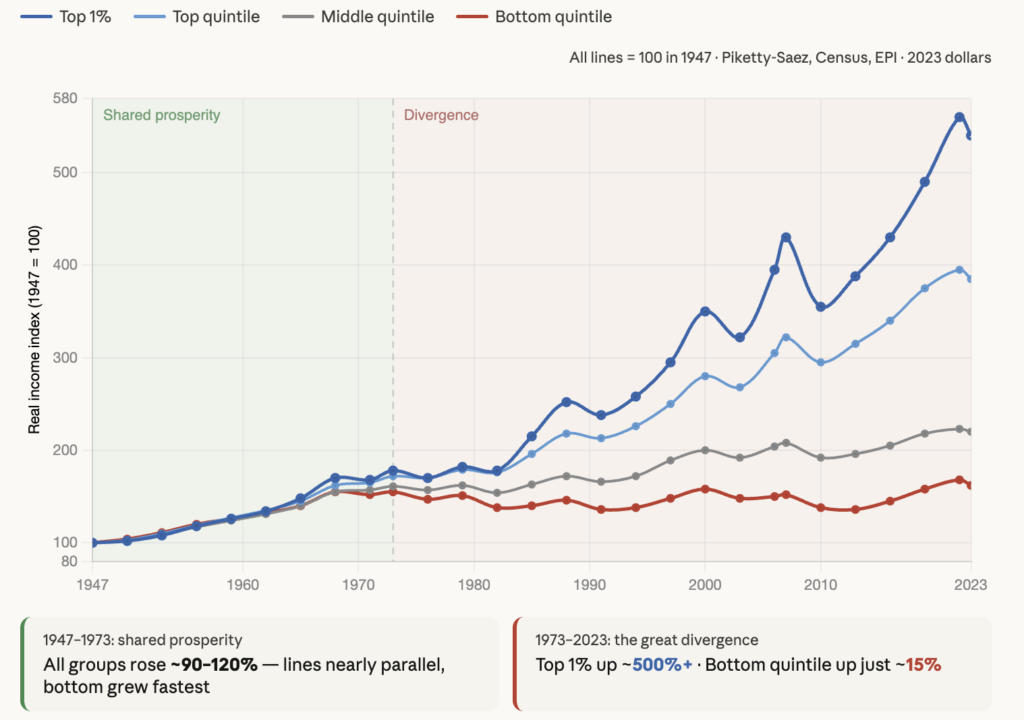
The rich got richer – everyone else got left behind
Powerful Republicans and Democrats made
government of, by, and for the rich
They
- give themselves an ever-increasing share of the nation’s wealth
- buy elections
- deny us the benefits of many other wealthy nations (which we could easily afford)
Votes speak louder than money
WE have the votes
Voters can pressure Congress
and take back democratic control
Going into the midterms,
the situation is really bad
- Powerful interests can spend unlimited amounts of money to influence elections.
- Public attention is diverted from the fundamental problems: to reclaim the government, we must overrule Citizens United — PREVENT THE POWERFUL FROM BUYING ELECTIONS — and end trickle-down — MAKE THE WEALTH DISTRIBUTION LESS EXTREME — and those issues are barely part of the national conversation.
The Power of Voters Between Elections
Democracy does not begin and end on Election Day. Although elections determine who holds office, the period between elections is when most governing actually takes place—and when organized citizens can have enormous influence over public policy.
Members of Congress, governors, state legislators, and local officials continually measure public opinion. They know that today’s public pressure can become tomorrow’s election result. History shows that persistent, organized citizen action has helped end wars, secure civil rights, expand voting rights, protect the environment, improve workplace safety, and influence countless legislative decisions.
Individual messages may have limited impact, but large numbers of informed, persistent voters acting together can become one of the most powerful forces in democratic government.
How to Reclaim
Government Of, By, and For the People
1.) Show Congress that you know how.
2.) Help enlist enough more people to get results:
We must raise public awareness of what’s been done to us and how we can overcome it.
- Email —
The “send button” may be a round blue icon with an up arrow in it at the upper right corner of the screen. - Easy email: plain text
The message will be copied to your clipboard before your email app opens. If your draft is blank or incomplete, simply erase whatever’s there, tap in the message area and hold down “control” (“command” on Apple”) and press “V”.
- Easy email: plain text
- Powerful email: this webpage
Click here and follow the instructions
- Powerful email: this webpage
- Events — Hand out flyers or carry rally signs at No Kings and Women’s March events
- Put posters in public places
~
A lot of Congressional candidates and incumbents have supported ending trickle-down — going back to a pre-Reagan, highly progressive, tax structure. If you’re among them and would like to get your name added to the list, send your campaign website’s URL to addme@us-sos.info
~
Peace is possible